Finance Automation
Modern Finance Document Processing: From Extraction to Vendor Statement Reconciliation
Salvador Repasa
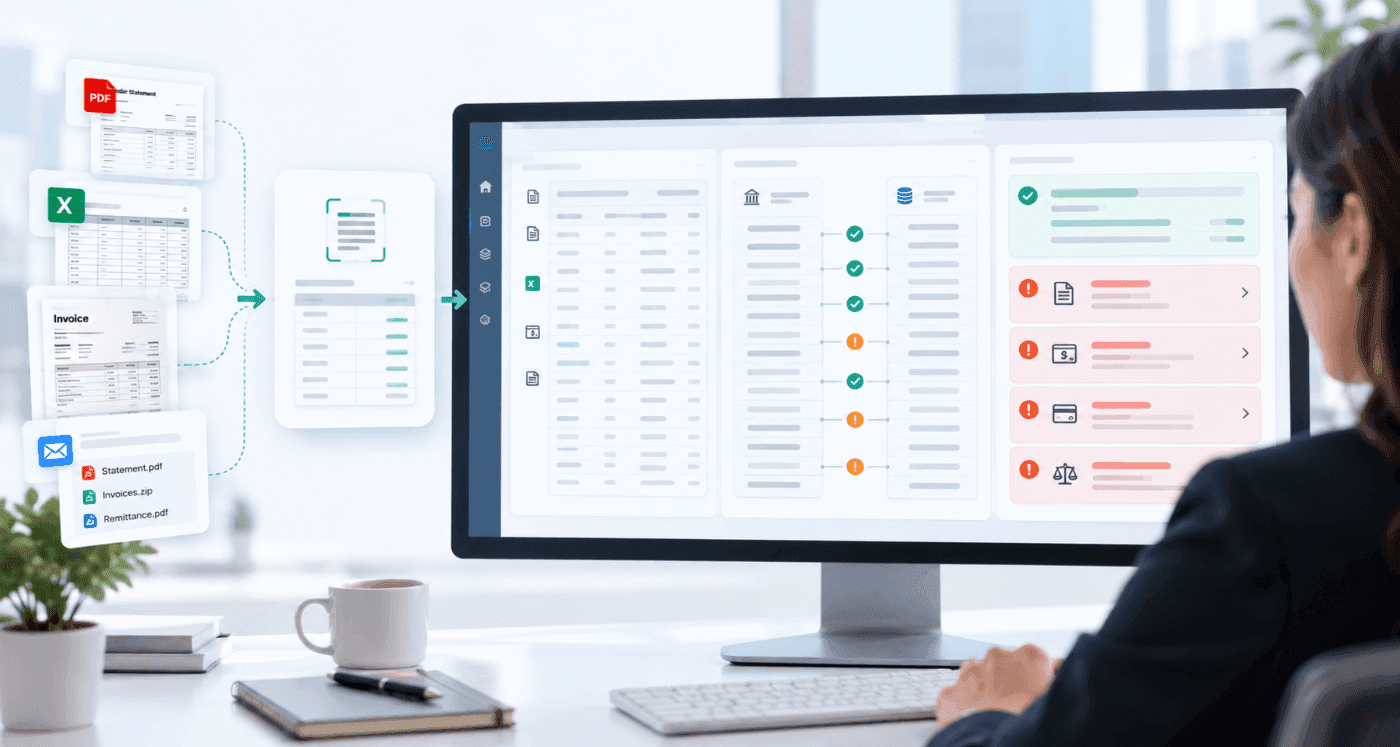
Modern finance teams do not have a document-storage problem. They have an information problem. Important details arrive in PDFs, spreadsheets, scans and email attachments, but the work begins only after someone has opened the file, understood it, compared it with another record and decided what needs attention.
That is what makes modern finance document processing different. The goal is not simply to store a document or convert it into text. The goal is to make the information usable in the finance workflow that follows.
For MyRepsoft, one of the clearest examples is vendor statement reconciliation. A vendor statement contains the supplier's view of invoices, credits, payments and outstanding balances. Your AP or ERP system contains your internal view. Reconciliation compares those two records and explains the differences.
The practical shift
Document -> structured financial data -> comparison -> reconciliation -> exceptions -> human action. That is more useful to finance than document storage or extraction alone.
What makes modern finance document processing different?
Traditional document management is mainly concerned with capture, storage, retrieval and access. Those functions still matter, but they do not resolve the manual work that happens when finance must interpret a document and compare it with another system.
Traditional approach | Modern finance approach |
|---|---|
Store the PDF | Extract and structure the financial information |
Search by file name or metadata | Understand fields, rows, references, dates, amounts and balances |
Open documents one by one | Process varied document formats consistently |
Manually compare with ERP data | Compare document data with AP / ERP records |
Investigate everything line by line | Move matched items aside and focus on exceptions |
Keep evidence in email or spreadsheets | Return clear reconciliation findings for review |
This distinction matters because a correctly extracted field is not automatically a resolved finance issue. A statement line can be read perfectly and still require someone to determine whether the related invoice exists in the ERP, whether a credit has been applied, or why the balances differ.
Why vendor statements are a high-value finance document
Vendor statements are useful because they provide an external view of what a supplier believes is outstanding. That can expose issues that are not obvious when finance looks only at its own AP records.
Common reconciliation exceptions can include:
Missing invoices: the vendor statement contains an invoice that is not visible in the AP record.
Unapplied credits: the vendor shows a credit that has not been reflected or applied internally.
Payment mismatches: the payment status or amount differs between the statement and internal records.
Unresolved balances: the supplier balance and AP balance cannot be explained without investigation.
Reference or timing differences: the transaction may exist on both sides but cannot be matched cleanly because references, dates or posting timing differ.
For a finance team handling hundreds of suppliers and thousands of transactions, checking every statement line manually can become repetitive and difficult to maintain consistently. The work often becomes reactive: a supplier complains, a payment becomes urgent, a credit hold appears, or month-end exposes a balance that needs explanation.
The better objective is not to inspect every line with equal effort. It is to identify which items already agree and direct people to the exceptions that require judgement.
Where AI-powered document extraction fits
Vendor statements do not arrive in one standard format. They may be PDFs, spreadsheets, scans or email attachments. Layouts, labels, columns and terminology vary by supplier. This is where AI-powered document data extraction becomes useful.
MyRepsoft uses document extraction to read complex financial documents without relying on one fixed template for every supplier format. The platform can extract, normalise and structure information so that it can be compared with finance data downstream.
Important distinction
Extraction is an enabling step, not the final outcome. For finance, the value increases when the structured statement data can be compared with the AP / ERP record and used to identify reconciliation exceptions.
Extraction is not the same as reconciliation
A generic extraction workflow may end when a supplier statement becomes JSON, CSV or another structured format. That is useful, but the finance team may still need to search the ERP, compare records and build a list of discrepancies manually.
This is the point where document intelligence becomes operationally useful. Finance does not need another system that simply tells it what text was found. It needs clear evidence of what matches, what does not, what may be missing and what needs to happen next.
Step | Stage | What happens |
|---|---|---|
1 | Vendor statement | PDF, spreadsheet, scan or email attachment |
2 | Structured data | Invoices, credits, payments, references, dates and balances are captured |
3 | AP / ERP data | Existing internal finance records provide the second side of the comparison |
4 | Reconciliation | Statement records are compared with AP / ERP records |
5 | Exceptions | Missing, mismatched or unresolved items are surfaced for review |
6 | Finance action | The team investigates the items that require judgement or follow-up |
How MyRepsoft fits into the finance stack
MyRepsoft is designed to work around the finance systems a company already uses. The starting point can be simple: provide vendor statements and an AP export, then compare the results. This allows a team to validate the reconciliation value before committing to a larger integration project.
No rip-and-replace required to start
Keep the ERP or AP platform as the system of record. MyRepsoft adds a reconciliation capability around the existing data and documents, with integration considered when recurring value is clear.
What this means for finance leaders
The same reconciliation workflow creates different value for different finance roles.
Role | Relevant value |
|---|---|
CFO | Fewer payment surprises, better visibility into unresolved AP issues, stronger confidence in liabilities and less time lost to avoidable escalation. |
Controller | A clearer way to explain statement-to-ledger differences and reduce unresolved items before month-end pressure builds. |
Finance Manager | Less repetitive checking and better visibility into where the team needs to investigate or follow up. |
Accountant | Cleaner supporting information for reconciliation, close and balance review. |
AP Manager / AP team | Less line-by-line searching across statements, ERP records, spreadsheets and email. More attention on missing invoices, credits and mismatches. |
What to look for in modern finance document processing
When evaluating a platform, avoid testing only a clean sample document. Use the files and records that create real work for your team. A useful evaluation should answer:
Document variability: Can it handle different supplier layouts without building and maintaining a rigid template for each one?
Structured finance data: Can it capture statement rows, references, dates, invoices, credits, payments and balances in a usable form?
Comparison capability: Can the extracted data be compared with AP or ERP records rather than stopping at extraction?
Exception visibility: Does the output make missing, mismatched and unresolved items clear?
Human control: Can finance review exceptions and supporting evidence before taking action?
Integration path: Can the team start with files or exports and integrate later if the workflow proves valuable?
Scalability: Can the approach handle growing supplier and statement volume without recreating the manual workload?
A practical way to start: prove the reconciliation value first
For an early evaluation, a focused sample is often more useful than a large transformation project. It keeps the test close to the business problem and makes the findings easier to judge.
Select a focused supplier sample. Choose statements that represent the formats and reconciliation issues the team actually handles.
Provide the corresponding AP / ERP data. Use the records the team would normally check against the statements.
Run the comparison. Extract and structure the statement data, then reconcile it with the internal records.
Review the findings. Look at matched items, missing records, credits, mismatches and unresolved exceptions.
Measure the practical value. Determine whether the output reduces investigation effort, identifies useful exceptions and fits the finance team's control process.
Integrate only when justified. If the workflow produces recurring value, decide which integrations, automation or broader deployment steps are worth adding.
Pilot question
Do not ask only, “Can the system read our documents?” Ask, “Can it show our finance team what is missing, what does not match and what needs attention?”
Common implementation mistakes
Automating a poorly defined control. Decide what constitutes a match, an acceptable timing difference and an exception before scaling the workflow.
Testing only perfect documents. Include real supplier variations, scans, spreadsheets and awkward references.
Measuring extraction only. High-quality extraction is important, but reconciliation quality depends on what happens after the data is captured.
Removing human judgement too early. Finance should remain in control of material or uncertain exceptions.
Starting with a major integration project. A file-based proof can often test the business value faster and with less disruption.
Frequently Asked Questions
What is vendor statement reconciliation?
Vendor statement reconciliation is the process of comparing a vendor or supplier statement with the organization's AP, accounting or ERP records and explaining the differences between the two views.
Is supplier statement reconciliation the same thing?
Yes. The terms vendor statement reconciliation and supplier statement reconciliation generally describe the same control. Using both terms in content is useful because finance teams and markets use different terminology.
Why reconcile vendor statements if the ERP already shows what we owe?
The ERP reflects the organization's internal record. The vendor statement reflects the supplier's record. Comparing them can expose missing invoices, unapplied credits, payment differences and other unresolved items that one side alone may not show.
What does AI document extraction add?
AI-powered extraction helps structure information from varied statement formats so the data can be used for comparison and reconciliation. The key value is not reading the PDF by itself, but making the information usable in the finance workflow that follows.
Does MyRepsoft replace the ERP?
No. MyRepsoft can start alongside the existing ERP or AP platform. Vendor statements and AP data can be compared without replacing the system of record.
Who should use vendor statement reconciliation software?
It is most relevant to finance and AP teams with meaningful supplier volume, varied statement formats, manual reconciliation work, unresolved AP exceptions or pressure to improve month-end visibility and supplier payment control.
From documents to decisions
Modern finance document processing is not defined by how many PDFs a system can store or how quickly it can recognise text. It is defined by whether document information becomes useful in the next finance process.
For MyRepsoft, vendor statement reconciliation is a practical example of that shift. Supplier statements are extracted and structured, compared with AP / ERP records, and reduced to the items finance needs to investigate. Matched items move out of the way. Exceptions receive attention.
Know what needs attention. Stay in control.
Bring us the vendor statements your current workflow struggles with.
Provide a focused sample and the related AP data. MyRepsoft can show what matches, what does not, what may be missing and what deserves your team's attention.