Finance Automation
End-to-End AP Automation: Where Reconciliation Fits
Salvador Repasa

Accounts payable automation is often described as an invoice-processing problem. That is only part of the picture. A complete AP process also has to connect documents, internal records, approvals, payments, supplier statements and exceptions.
Many organizations automate invoice capture and approval but still rely on spreadsheets, inboxes and manual searches to reconcile supplier accounts. That gap matters because missing invoices, unapplied credits, payment mismatches and unresolved balances often become visible only when the vendor statement is compared with the ERP or AP ledger.
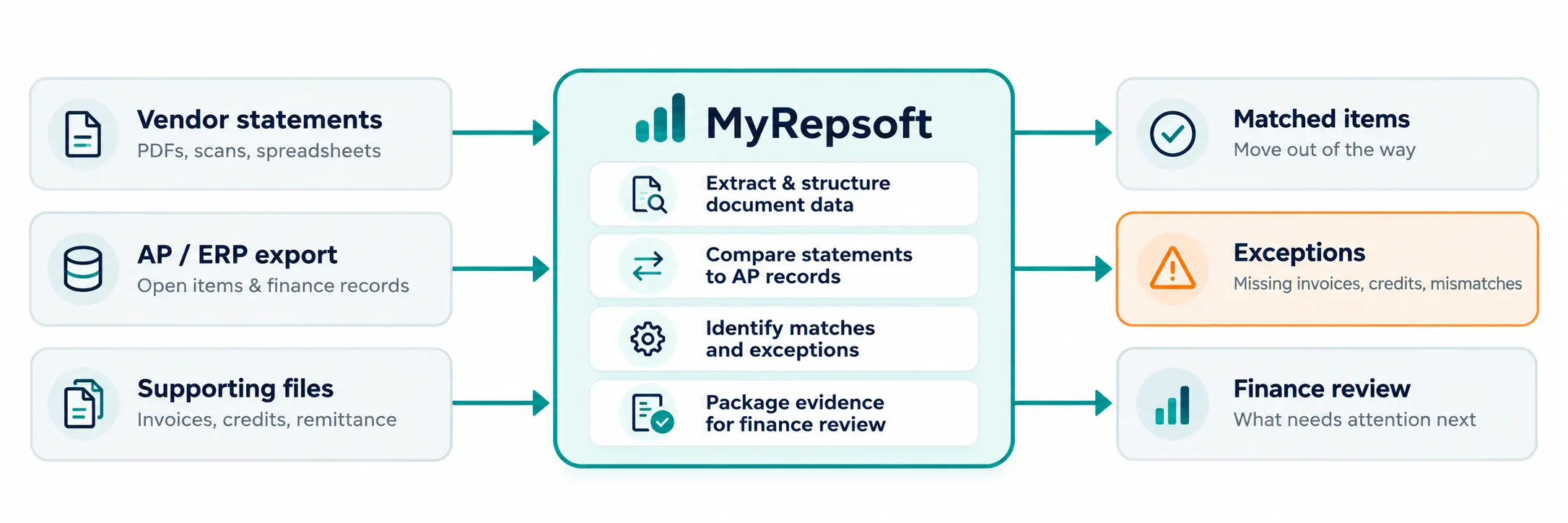
MyRepsoft focuses on that gap. It helps finance teams structure financial document data, compare vendor statements with AP records, and surface the exceptions that need attention. It is designed to work alongside the ERP and existing AP environment - not replace them.
The positioning to keep clear
MyRepsoft is not a full payment, approval-routing or ERP replacement platform. Its strongest entry point is vendor statement reconciliation, supported by document data extraction and exception-focused workflows.
Core message: Keep your ERP. Strengthen what happens around it.
What end-to-end AP automation actually means
End-to-end AP automation is the use of technology and controlled workflows across the accounts payable lifecycle - from document receipt through validation, matching, approval, payment readiness, reconciliation and exception resolution.
The goal is not to remove finance oversight. It is to reduce repetitive preparation and checking, while giving people clearer visibility into the items that require judgment.
A strong AP process connects the stages. Automating one step does not automatically remove manual work from the rest of the workflow.
A mature AP process typically includes:
Document intake - invoices, statements, credit notes and supporting documents enter a controlled process.
Data extraction and validation - key information is captured and checked before downstream use.
Matching - invoice and document data is compared with purchase orders, receipts, supplier records or existing transactions.
Approval and control - business rules determine who must review or approve an item.
Payment preparation - approved liabilities move into the organization's existing ERP, treasury or payment workflow.
Reconciliation - supplier statements are compared with AP records to identify what agrees and what does not.
Exception resolution - finance investigates missing documents, credits, payment issues and balance differences.
Why this matters
If invoice capture is automated but supplier statement reconciliation still depends on line-by-line checking, a significant part of the AP control process remains manual.
Where AP automation often stops too early
Many AP projects begin with the most visible pain: invoice entry and approvals. That can remove important manual work, but it does not necessarily answer a later control question: does the vendor view of the account agree with the company's records?
The ERP shows the internal record. The vendor statement shows the supplier's view. Neither view alone explains every difference.
Vendor statement reconciliation is therefore not a duplicate of invoice automation. It is a control that compares two perspectives and explains the difference between them.
This is where MyRepsoft should be positioned strongly. The problem is not simply processing more invoices. The problem is knowing what is missing, what does not match, and what needs action before the issue becomes urgent.
Typical AP automation coverage | Reconciliation questions that may remain |
|---|---|
Invoice received and captured | Is the supplier statement showing an invoice missing from AP? |
Invoice matched and approved | Is there a credit on the statement that has not been applied internally? |
Liability posted | Has a payment been made but the item still appears open on the supplier statement? |
Payment sent | Does the supplier balance agree with the AP ledger? |
Transaction archived | Which unresolved items could become a supplier escalation, credit hold or month-end issue? |
Why vendor statement reconciliation belongs in the AP automation conversation
Vendor statement reconciliation compares the supplier statement with internal AP or ERP records. Done well, it can expose issues that are difficult to see from internal records alone.
Missing invoices - present on the supplier statement but not recorded internally.
Unapplied or missing credits - credits that reduce what the business owes but are not reflected correctly.
Payment mismatches - payments that have not been allocated as expected.
Paid-but-still-open items - transactions that appear settled internally but remain open with the supplier.
Duplicate or incorrect balances - records that require investigation before payment or close.
Timing differences - legitimate differences that should be distinguished from genuine exceptions.
For CFOs and Controllers, the value is not the number of lines reconciled. The value is earlier visibility into exceptions that can affect cash, supplier continuity, reporting and month-end confidence.
MyRepsoft message
Start with the exceptions. Not every line. Matched items move out of the way; finance focuses on the records that need judgment.
Where MyRepsoft fits in the AP technology stack
MyRepsoft should not be presented as a replacement for the full AP stack. Its commercial strength is narrower and clearer: help finance teams handle document-heavy reconciliation work that still sits between supplier documents and the ERP.
The standalone-first model means a finance team can begin with vendor statements and an AP export without a major integration project. MyRepsoft can compare the two, produce reconciliation results and surface exceptions for review. If the workflow proves recurring value, integration can follow later.
Manual starting point | Exception-focused starting point |
|---|---|
Open every statement. Search the ERP. Compare line by line. Build a spreadsheet. Investigate differences. | See what matched. Review what did not. Understand why. Decide what happens next. |
The practical shift
Know what needs attention. Stay in control.
What the value looks like by finance role
The business case is strongest where reconciliation is frequent, document-heavy and difficult to maintain manually - especially with high supplier counts, high invoice volumes, multiple entities or recurring month-end pressure.
Qualification signal
If the team rarely reconciles supplier statements, has low transaction volume, or does not experience material statement-to-ledger exceptions, the urgency may be weak.
How to evaluate AP automation without buying more software than you need
Finance leaders should evaluate the workflow first, then the technology. A large feature list is less useful if the process still leaves people manually connecting documents and records between systems.
Where is the manual work really happening? Invoice capture, approvals, supplier queries, statement reconciliation, exception investigation or all of the above?
What still sits outside the ERP? Statements, credits, inbox attachments, spreadsheets and evidence often remain fragmented.
How are exceptions handled? A useful system should make uncertainty visible and assignable rather than hiding it.
Can the solution coexist with current systems? The fastest path to value may be to strengthen the existing stack rather than replace it.
Can value be proven with a focused sample? A short pilot using real documents is more useful than a feature-heavy demo.
What happens after automation? The output should be actionable: matched, missing, mismatched, unresolved and ready for review.
A practical MyRepsoft pilot
Start with a focused sample of real vendor statements and the corresponding AP or ERP data. Review what matched, what is missing, what differs and what deserves action.
Role | What they care about | Reconciliation risk | MyRepsoft angle |
|---|---|---|---|
CFO | Cash visibility, control, supplier continuity | Issues surface late as escalations or close surprises | Earlier visibility into material exceptions |
Controller | Accuracy, close, auditability | Open balances and credits require manual investigation | Clear statement-to-ledger differences and evidence |
Finance Manager | Workload, process ownership, team capacity | Reconciliation depends on spreadsheets and staff memory | More repeatable workflow and easier prioritisation |
AP Lead / Accountant | Daily processing and supplier follow-up | Time lost searching, comparing and chasing missing items | Matched items move aside; exceptions become the worklist |
Frequently asked questions
What is end-to-end AP automation?
It is the use of technology and controlled workflows across the AP lifecycle, including document capture, validation, matching, approvals, payment preparation, reconciliation and exception handling.
Does AP automation include vendor statement reconciliation?
It should be considered part of the broader AP control process. Many organizations automate invoices first but still reconcile supplier statements manually.
Why reconcile vendor statements if invoices are already in the ERP?
Because the supplier statement is an external view of the account. Comparing it with internal AP records can reveal missing invoices, credits, payment allocation differences and unresolved balances.
Does MyRepsoft replace the ERP or AP platform?
No. MyRepsoft is designed to work alongside existing finance systems, starting with vendor statements and AP data and adding integration when it makes sense.
Can MyRepsoft start without a large integration project?
Yes. A focused sample can begin with vendor statements and an AP or ERP export so the team can evaluate reconciliation findings before deeper integration.
What should AP teams measure in a reconciliation pilot?
Useful measures include exceptions found, missing invoices or credits identified, time spent on manual comparison, repeatability of results, and whether the findings are actionable for the finance team.
Know what needs attention. Stay in control.